Entity Relationship Diagram
The Graphviz gallery includes a Chen-style entity relationship diagram. We can reproduce that example by transcribing the gallery’s DOT language input file to gvdot calls.
dot = Dot().graph(layout="neato")
dot.all_default(fontname="Helvetica,Arial,sans-serif")

dot.node_role("entity",shape="box")
dot.node_role("attribute",shape="ellipse")
dot.node_role("relationship",shape="diamond",style="filled",color="lightgrey")

dot.node('course', role="entity")
dot.node('institute', role="entity")
dot.node('student', role="entity")

dot.node('name0', label='name', role="attribute")
dot.node('name1', label='name', role="attribute")
dot.node('name2', label='name', role="attribute")

dot.node('code', role="attribute")
dot.node('grade', role="attribute")
dot.node('number', role="attribute")

dot.node('C-I', role="relationship")
dot.node('S-C', role="relationship")
dot.node('S-I', role="relationship")

dot.edge('name0', 'course')
dot.edge('code', 'course')
dot.edge('course', 'C-I', label='n', len=1.0)
dot.edge('C-I', 'institute', label='1', len=1.0)
dot.edge('institute', 'name1')
dot.edge('institute', 'S-I', label='1', len=1.0)
dot.edge('S-I', 'student', label='n', len=1.0)
dot.edge('student', 'grade')
dot.edge('student', 'name2')
dot.edge('student', 'number')
dot.edge('student', 'S-C', label='m', len=1.0)
dot.edge('S-C', 'course', label='n', len=1.0)

dot.graph(fontsize=20, label='\n\nEntity Relation Diagram\ndrawn by NEATO')

dot.show(size="5,5")
Aside from method calls instead of DOT statements, the primary difference between the original DOT file and the transcription is that the DOT file restates node defaults three times to reduce explicit attribute value assignments, while the code uses gvdot roles.
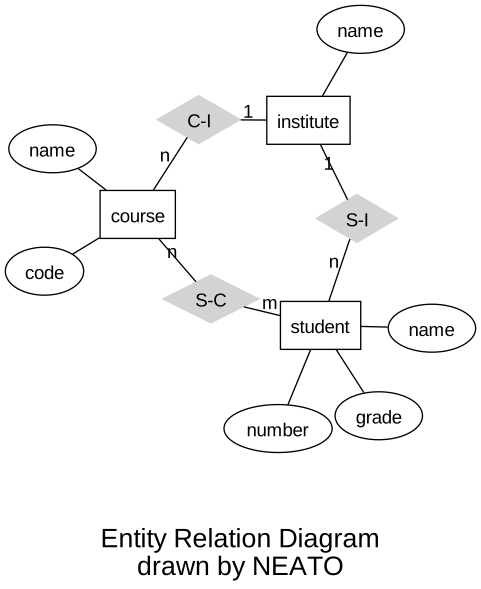
The transcription output matches the original.
Restating defaults is convenient when writing DOT by hand, but it can be awkward when programmatically generating DOT directly because it forces code to group together nodes and edges in a way that may be inconsistent with the structure of the code’s input. That’s not a problem for gvdot applications because gvdot supports order independence and roles.
Suppose we want to generate diagrams from ER models represented by the following classes.
@dataclass
class Entity:
    name : str
    attributes : list[str]

@dataclass
class Participant:
    entity : str
    cardinality : str

@dataclass
class Relationship:
    name : str
    participants : list[Participant]

@dataclass
class Model:
    entities : list[Entity]
    relationships : list[Relationship]
Let’s create a model based on the gallery example.
example_model = Model(
    entities = [
        Entity("course",["name","code"]),
        Entity("institute",["name"]),
        Entity("student",["name","number","grade"]),
    ],
    relationships = [
        Relationship("C-I",[
            Participant("course","n"),
            Participant("institute","1")]),
        Relationship("S-I",[
            Participant("institute","1"),
            Participant("student","n")]),
        Relationship("S-C",[
            Participant("course","n"),
            Participant("student","m"),
        ])
    ])
Chen ER-diagrams use rectangles for entities, ellipses for attributes, and diamonds for relationships. We define an ER-diagram theme with those shapes. We also choose the same font and layout engine as the gallery, and define edge roles as well.
er_base_theme = (Dot()
    .graph(layout="neato")
    .all_default(fontname="Helvetica,Arial,sans-serif")
    .node_role("entity", shape="box")
    .node_role("attribute", shape="ellipse")
    .node_role("relationship", shape="diamond")
    .edge_role("e-to-r", len=1.0)  # entity-to-relationship
    .edge_role("a-to-e"))          # attribute-to-entity
The gallery example uses a solid light grey for relationships, so we specialize the theme a bit.
er_gallery_theme = (Dot().use_theme(er_base_theme)
    .node_role("relationship", style="filled", color="lightgrey"))
Now we write our code to generate diagrams from models. Observe there are no presentation-related attribute assignments. We could have them, of course, but relying on roles and defaults from the theme makes the code easy to understand and maintain.
def er_diagram(model:Model, title:str, theme:Dot) -> Dot:
    dot = Dot().use_theme(theme)
    for entity in model.entities:
        dot.node(entity.name, role="entity")
        for attribute in entity.attributes:
            attribute_id = Nonce("attribute")
            dot.node(attribute_id, role="attribute", label=attribute)
            dot.edge(entity.name, attribute_id, role="a-to-e")
    for relationship in model.relationships:
        dot.node(relationship.name, role="relationship")
        for participant in relationship.participants:
            dot.edge(relationship.name,participant.entity,
                    label=participant.cardinality, role="e-to-r")
    dot.graph(fontsize=16, label=f"\n{title}")
    return dot

diagram = er_diagram(example_model, "Generated Using gvdot", er_gallery_theme)
diagram.show(size="5,5")
Notice we use Nonce objects to identify attribute nodes. We can’t use
attribute names because attribute names are not unique within a model.
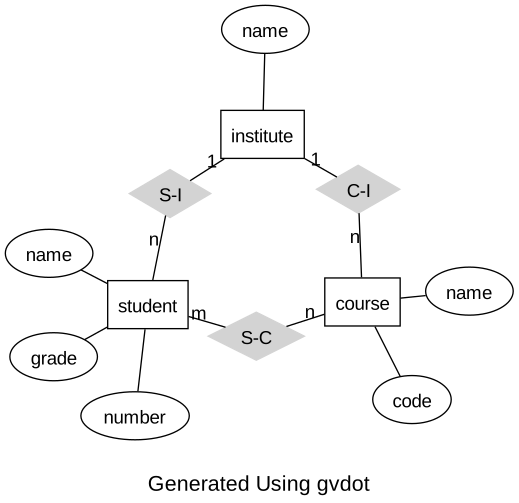
The layout differs because neato depends on statement order.
The generated diagram is equivalent to the transcribed version. We can see how gvdot incorporated the theme and roles by examining its DOT language representation by either executing something like
print(diagram)
or in a notebook
diagram.show_source()
which displays
graph {

    graph [fontname="Helvetica,Arial,sans-serif"]
    node [fontname="Helvetica,Arial,sans-serif"]
    edge [fontname="Helvetica,Arial,sans-serif"]

    layout=neato
    fontsize=16

    course [shape=box]
    attribute_1 [label="name" shape=ellipse]
    attribute_2 [label="code" shape=ellipse]
    institute [shape=box]
    attribute_3 [label="name" shape=ellipse]
    student [shape=box]
    attribute_4 [label="name" shape=ellipse]
    attribute_5 [label="number" shape=ellipse]
    attribute_6 [label="grade" shape=ellipse]
    "C-I" [shape=diamond style=filled color=lightgrey]
    "S-I" [shape=diamond style=filled color=lightgrey]
    "S-C" [shape=diamond style=filled color=lightgrey]

    course -- attribute_1
    course -- attribute_2
    institute -- attribute_3
    student -- attribute_4
    student -- attribute_5
    student -- attribute_6
    "C-I" -- course [label="n" len=1.0]
    "C-I" -- institute [label="1" len=1.0]
    "S-I" -- institute [label="1" len=1.0]
    "S-I" -- student [label="n" len=1.0]
    "S-C" -- course [label="n" len=1.0]
    "S-C" -- student [label="m" len=1.0]

    label="\nGenerated Using gvdot"
}
The gallery theme is quite plain looking. Let’s render something with color. All we need to do is change the theme – we don’t even need to rebuild the diagram.
er_color_theme = (Dot().use_theme(er_base_theme)
    .node_role("entity",style="filled",fillcolor="darkolivegreen2")
    .node_role("attribute",style="filled",fillcolor="lightblue")
    .node_role("relationship",style="filled",fillcolor="sandybrown"))

diagram.use_theme(er_color_theme)
diagram.show(size="5,5")
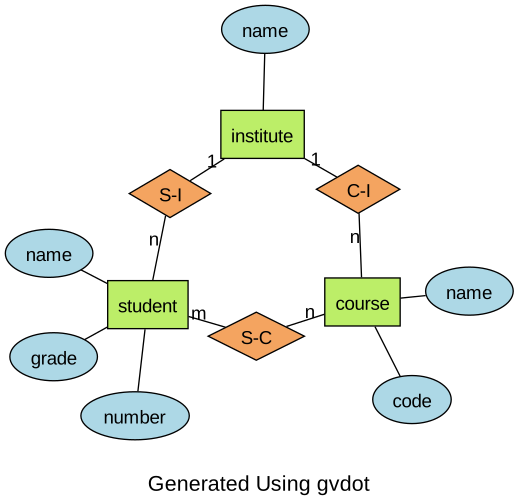
Much nicer.
Let’s save this one.
diagram.save("er-diagram.svg")
You can run the Entity Relationship Diagram example yourself by downloading the notebook from GitHub.