gvdot
Package gvdot makes it easy to generate and render Graphviz diagrams with clear, maintainable code by separating presentation from structure.
The heart of gvdot is class Dot, a DOT language builder. Applications
create diagrams using Dot methods, then either convert the instance to
DOT language text or render it as SVG or an image. Users can also
interactively display Dot objects in notebooks.
Example
Suppose we want to generate diagrams of nondeterministic finite automata like this:
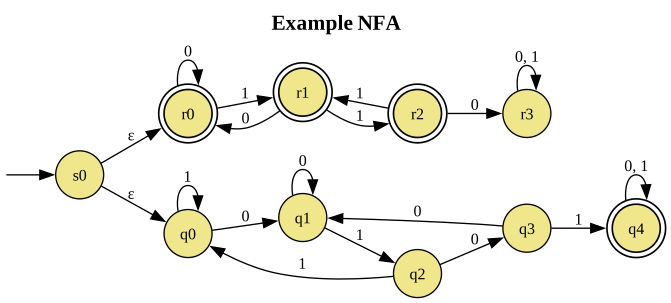
represented by instances of
@dataclass
class NFA:
    alphabet : str
    delta    : dict[str, list[list[str]]]
    final    : list[str]
    start    : str
where delta["q"][0] is the list of states reached from state \(q\) by
epsilon transitions, and delta["q"][i] is the list of states reached from
\(q\) by symbol alphabet[i-1].
We start by defining a theme, a normal Dot object from which other dot
objects can inherit graph attributes, default attributes, and roles.
nfa_theme = (Dot()
   .all_default(fontsize=12)
   .node_default(shape="circle", style="filled", fillcolor="khaki")
   .node_role("init", label="", shape="none", width=0, height=0)
   .node_role("final", shape="doublecircle", penwidth=1.25)
   .graph(rankdir="LR", labelloc="t", fontsize=16))
The theme defines two gvdot roles, collections of Graphviz attribute values that applications can assign to diagram elements by name.
Having isolated presentation attributes in a theme, our generation code is straightforward.
def nfa_diagram(nfa:NFA, title:str):
dot = Dot(directed=True).use_theme(nfa_theme)
dot.graph(label=Markup(f"<b>{title}</b>"))
init_id = Nonce()
dot.node(init_id, role="init")
dot.edge(init_id, nfa.start)
for state in nfa.final:
dot.node(state, role="final")
for state, transitions in nfa.delta.items():
merged = defaultdict(list)
for index, targets in enumerate(transitions):
for target in targets:
merged[target].append(
nfa.alphabet[index-1] if index > 0 else 'ε')
for target, symbols in merged.items():
dot.edge(state, target, label=", ".join(symbols))
return dot
We can render and save the diagram above with
example = NFA("01", {
    "s0": [["q0", "r0"], [], []],
    "q0": [[], ["q1"], ["q0"]],
    "q1": [[], ["q1"], ["q2"]],
    "q2": [[], ["q3"], ["q0"]],
    "q3": [[], ["q1"], ["q4"]],
    "q4": [[], ["q4"], ["q4"]],
    "r0": [[], ["r0"], ["r1"]],
    "r1": [[], ["r0"], ["r2"]],
    "r2": [[], ["r3"], ["r1"]],
    "r3": [[], ["r3"], ["r3"]],
}, ["q4","r0","r1","r2"], "s0")

nfa_diagram(example,"Example NFA").save("example.svg")
In a notebook, we can directly display the diagram from a cell containing
nfa_diagram(example,"Example NFA").show()