Quick Tour
from gvdot import Dot, Markup, Port, Nonce
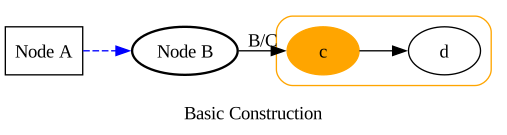
Class Dot is a DOT language builder. Method graph()
establishes or amends graph attributes. node() and
edge() define and amend nodes and edges. Method
subgraph() defines or amends subgraphs, returning an instance
of Block, the base class of Dot. Most builder methods are
actually Block methods.
Code |
dot = Dot(directed=True)
dot.graph(label="Basic Construction", rankdir="LR")
dot.node("a", label="Node A", shape="box")
dot.node("b", label="Node B")
dot.edge("a", "b", style="dashed", color="blue")
dot.edge("b", "c", label=" B/C ")
block = dot.subgraph("cluster_1")
block.graph(style="rounded", color="orange")
block.node("c", style="filled", color="orange")
block.edge("c","d")
dot.node("b", penwidth=1.75)        # Amend node b
dot.edge("b", "c", labelfloat=True) # Amend b -> c
|
DOT language |
digraph {

    rankdir=LR

    a [label="Node A" shape=box]
    b [label="Node B" penwidth=1.75]

    a -> b [style=dashed color=blue]
    b -> c [label=" B/C " labelfloat=true]

    subgraph cluster_1 {
        style=rounded
        color=orange
        c [style=filled color=orange]
        c -> d
    }

    label="Basic Construction"
}
|
Rendered |
|
str(dot) returns a Dot object’s DOT language
representation. Dot invokes Graphviz programs with that
representation as input, rendering to files (save()), image bytes
(to_rendered()), or SVG strings (to_svg()). In
notebooks, show() and show_source() display rendered SVG
and DOT language.
Use anywhere |
dot.save("images/basic.png")          # Write to file
data = dot.to_rendered(format="jpg")  # Get image bytes
svg = dot.to_svg()                    # Get SVG
print(dot)                            # Print DOT language
|
Use in notebooks |
dot.show()         # Display rendered SVG
dot.show_source()  # Display DOT language
|
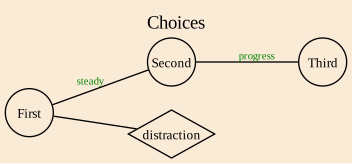
Methods graph_default(), node_default(), and
edge_default() establish or amend default attributes for graphs,
nodes, and edges.
Code |
dot = Dot()
dot.graph_default(labelloc="t", rankdir="LR", bgcolor="antiquewhite")
dot.node_default(shape="circle", fontsize=10, margin=0)
dot.edge_default(fontsize=8, fontcolor="green")
dot.graph(label="Choices")
dot.node(1, label="First")
dot.node(2, label="Second")
dot.node(3, label="Third")
dot.node("distraction", shape="diamond")
dot.edge(1, 2, label="steady")
dot.edge(2, 3, label="progress")
dot.edge(1, "distraction")
|
DOT language |
graph {

    graph [labelloc=t rankdir=LR bgcolor=antiquewhite]
    node [shape=circle fontsize=10 margin=0]
    edge [fontsize=8 fontcolor=green]

    1 [label="First"]
    2 [label="Second"]
    3 [label="Third"]
    distraction [shape=diamond]

    1 -- 2 [label="steady"]
    2 -- 3 [label="progress"]
    1 -- distraction

    label="Choices"
}
|
Rendered |
|
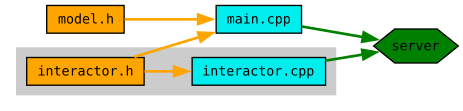
A role is a named collection of attribute values. Methods
graph_role(), node_role(), and edge_role()
define or amend roles. Assigning a role name to an element’s role
attribute causes that element to inherit the role’s attribute values.
Code |
dot = Dot(directed=True).graph(rankdir="LR")
dot.graph_role("library", cluster=True, bgcolor="gray80", penwidth=0)
dot.node_role("header", shape="box", fillcolor="orange")
dot.node_role("source", shape="box", fillcolor="cyan2")
dot.node_role("executable", shape="hexagon", fillcolor="green", margin=0.02)
dot.edge_role("include", color="orange", penwidth=2)
dot.edge_role("link", color="green", penwidth=2)
dot.node_default(style="filled", width=0, height=0,
                 fontsize=10, fontname="monospace")
block = dot.subgraph().graph(role="library")
block.node("interactor.h", role="header")
block.node("interactor.cpp", role="source")
block.edge("interactor.h", "interactor.cpp", role="include")
dot.node("model.h", role="header")
dot.node("main.cpp", role="source")
dot.node("server", role="executable")
dot.edge("model.h", "main.cpp", role="include")
dot.edge("interactor.h", "main.cpp", role="include")
dot.edge("main.cpp", "server", role="link")
dot.edge("interactor.cpp", "server", role="link")
|
DOT language |
digraph {

    node [style=filled width=0 height=0 fontsize=10 fontname=monospace]

    rankdir=LR

    "model.h" [shape=box fillcolor=orange]
    "main.cpp" [shape=box fillcolor=cyan2]
    server [shape=hexagon fillcolor=green margin=0.02]

    "model.h" -> "main.cpp" [color=orange penwidth=2]
    "interactor.h" -> "main.cpp" [color=orange penwidth=2]
    "main.cpp" -> server [color=green penwidth=2]
    "interactor.cpp" -> server [color=green penwidth=2]

    subgraph {
        cluster=true
        bgcolor=gray80
        penwidth=0
        "interactor.h" [shape=box fillcolor=orange]
        "interactor.cpp" [shape=box fillcolor=cyan2]
        "interactor.h" -> "interactor.cpp" [color=orange penwidth=2]
    }
}
|
Rendered |
|
A theme is a normal Dot object from which other Dot objects inherit
graph attributes, default attributes, and roles. Method use_theme()
establishes the inheritance relationship.
Code |
list_theme = Dot()
list_theme.all_default(penwidth=1.25)
list_theme.node_default(shape="box", width=0, height=0, style="filled")
list_theme.edge_default(arrowsize=0.75)
list_theme.node_role("element", margin=0.05, fillcolor="khaki")
list_theme.node_role("nil", label="NIL", fontname="sans-serif",
                     fontsize=8, margin=0.02)
list_theme.edge_role("link", color="#333")
list_theme.edge_role("nil", style="dashed")
list_theme.graph(rankdir="LR")

dot = Dot(directed=True)
dot.use_theme(list_theme)
dot.node("Fred", role="element")
dot.node("Wilma", role="element")
dot.node("Betty", role="element")
dot.node("Barney", role="element")
dot.edge("Fred", "Wilma", role="link")
dot.edge("Wilma", "Betty", role="link")
dot.edge("Betty", "Barney", role="link")
dot.edge("Barney", "nil", role="nil")
dot.node("nil", role="nil")
|
DOT language |
digraph {

    graph [penwidth=1.25]
    node [penwidth=1.25 shape=box width=0 height=0 style=filled]
    edge [penwidth=1.25 arrowsize=0.75]

    rankdir=LR

    Fred [margin=0.05 fillcolor=khaki]
    Wilma [margin=0.05 fillcolor=khaki]
    Betty [margin=0.05 fillcolor=khaki]
    Barney [margin=0.05 fillcolor=khaki]
    nil [label="NIL" fontname="sans-serif" fontsize=8 margin=0.02]

    Fred -> Wilma [color="#333"]
    Wilma -> Betty [color="#333"]
    Betty -> Barney [color="#333"]
    Barney -> nil [style=dashed]
}
|
Rendered |

|
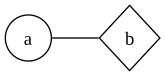
Most methods return self, enabling chained method calls.
Code |
dot = Dot().graph(rankdir="LR").node_default(width=0, height=0)
dot.node("a", shape="circle").node("b",shape="diamond")
dot.edge("a","b")
|
DOT language |
graph {
    node [width=0 height=0]
    rankdir=LR
    a [shape=circle]
    b [shape=diamond]
    a -- b
}
|
Rendered |
|
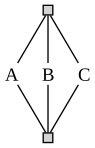
A Nonce is a placeholder for a unique identifier generated by
Dot. Those generated identifiers will not conflict with any others,
either generated or explicitly provided.
Code |
theme = Dot()
theme.node_default(shape="plain")
theme.edge_default(arrowhead="none")
theme.node_role("anchor", label="", width=.10, height=.10,
                style="filled", shape="square")

dot = Dot(directed=True).use_theme(theme)
source = Nonce()
sink = Nonce()
dot.node(source, role="anchor")
dot.node(sink, role="anchor")
dot.edge(source,"A").edge("A",sink)
dot.edge(source,"B").edge("B",sink)
dot.edge(source,"C").edge("C",sink)
|
DOT language |
digraph {

    node [shape=plain]
    edge [arrowhead=none]

    _nonce_1 [label="" width=0.1 height=0.1 style=filled shape=square]
    _nonce_2 [label="" width=0.1 height=0.1 style=filled shape=square]

    _nonce_1 -> A
    A -> _nonce_2
    _nonce_1 -> B
    B -> _nonce_2
    _nonce_1 -> C
    C -> _nonce_2
}
|
Rendered |
|
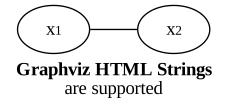
Applications use Markup to delineate Graphviz HTML strings.
Code |
dot = Dot()
dot.graph(rankdir="LR", label=Markup(
    '<b>Graphviz HTML Strings</b><br/>are supported'))
dot.node(1,label=Markup('x<sub><font point-size="10">1</font></sub>'))
dot.node(2,label=Markup('x<sub><font point-size="10">2</font></sub>'))
dot.edge(1,2)
|
DOT language |
graph {
    rankdir=LR
    1 [label=<x<sub><font point-size="10">1</font></sub>>]
    2 [label=<x<sub><font point-size="10">2</font></sub>>]
    1 -- 2
    label=<<b>Graphviz HTML Strings</b><br/>are supported>
}
|
Rendered |
|
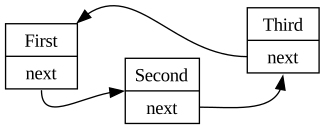
An edge endpoint can be a Port.
Code |
dot = Dot(directed=True)
dot.graph(rankdir="LR")
dot.node_default(shape="record")
dot.node("node1", label="First|<link>next")
dot.node("node2", label="Second|<link>next")
dot.node("node3", label="Third|<link>next")
dot.edge(Port("node1","link", "s"), Port("node2", cp="w"))
dot.edge(Port("node2","link"), Port("node3", cp="s"))
dot.edge(Port("node3","link"), Port("node1", cp="ne"))
|
DOT language |
digraph {
    node [shape=record]
    rankdir=LR
    node1 [label="First|<link>next"]
    node2 [label="Second|<link>next"]
    node3 [label="Third|<link>next"]
    node1:link:s -> node2:w
    node2:link -> node3:s
    node3:link -> node1:ne
}
|
Rendered |
|
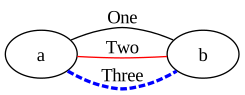
Dot constructor argument multigraph=True enables multiple edges
between endpoints. Discriminants allow those edges to be amended.
Code |
dot = Dot(multigraph=True).graph(rankdir="LR")
dot.edge("a", "b", label="One")
dot.edge("a", "b", label="Two", color="red")
dot.edge("a", "b", "x", label="Three", style="dashed")
dot.edge("a", "b", "x", color="blue", penwidth=2.5) # Amend third edge
|
DOT language |
graph {
    rankdir=LR
    a -- b [label="One"]
    a -- b [label="Two" color=red]
    a -- b [label="Three" style=dashed color=blue penwidth=2.5]
}
|
Rendered |
|
Keep in Mind
While several Dot methods correspond to DOT language statements, gvdot
is not a DOT language format printer, streaming out DOT language statements
with every call.
Instead, applications build Graphviz diagrams structurally starting with a
Dot object. When finished, they save or render a DOT language
representation of that object. Method call order is for the most part
irrelevant, and amendments to already defined elements do not create additional
DOT language statements; they change the one statement ultimately emitted.
Similarly, roles, themes, and nonces are not resolved until a DOT language representation is required, and those resolutions are ephemeral — further changes to the Dot object, roles, or themes can lead to different resolutions if a DOT language representation is required again.
This tour is available as a notebook on GitHub.