Discussion
Class Dot
Graphviz is a family of programs for drawing graphs. The input to these
programs is a graph expression written in the DOT language. Class Dot is a DOT
language builder. To produce a diagram, applications create a Dot object then
use it to define and amend nodes, edges, subgraphs, and graph-level attributes.
Applications can also style diagrams with themes and roles. Once complete,
applications convert the object to DOT language text or render it as SVG or an
image. Notebook users can also interactively display Dot objects in Jupyter
notebooks.
The string representation of a Dot object is DOT language text, the same text used when rendering the Dot object. For example,
dot = Dot(directed=True)
dot.graph(rankdir="LR", labelloc="t", label="Rolling Back")
dot.node("old", color="green", label=Markup("d<sub>k</sub>"))
dot.node("new", color="red", label=Markup("d<sub>k+1</sub>"))
dot.edge("old", "new", label="apply")
dot.edge(Port("new",cp="s"), Port("old",cp="s"), label="undo")
print(dot)
produces
digraph {
    rankdir=LR
    labelloc=t
    old [color=green label=<d<sub>k</sub>>]
    new [color=red label=<d<sub>k+1</sub>>]
    old -> new [label="apply"]
    new:s -> old:s [label="undo"]
    label="Rolling Back"
}
and
dot.save("rollback.svg")
renders that DOT language text as the SVG file
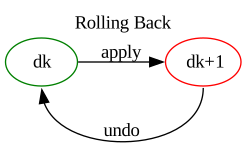
Dot always produces DOT language statements and other lines in
the following order, regardless of the order in which defining Dot
methods are called.
Optional comment lines.
The graph header and opening bracket (Example:
graph mygraph {)At most one graph default attributes statement.
At most one node default attributes statement.
At most one edge default attributes statement.
All graph attribute assignments, excluding “label”.
One node statement per defined node.
One (non-multigraph) or more (multigraph) edge statements per node pair between which there is a defined edge. Those node pairs are ordered for directed graphs and unordered otherwise.
Subgraphs. Each subgraph consists of multiple lines following the same order as this list, except that subgraphs do not have comments and begin with a subgraph header.
The graph “label” attribute, if any. (The reason for this special case is that a Graphviz graph label assignment is inherited by any subgraph that follows it, which is undesirable.)
The graph closing bracket
Dot takes steps to produce readable DOT language representations:
it indents reasonably, avoids unnecessary ID quoting (see below), and
separates sections with blank lines unless there are few statements.
IDs
The DOT language grammar uses non-terminal ID for both entity identifiers and
attribute values. Lexically, an ID can be an unquoted character sequence
that looks like a number or programming language identifier, a quoted string,
or a Graphviz HTML string. Package gvdot defines type ID to represent
ID values:
type ID = str | int | float | bool | Markup | Nonce
where Markup is a gvdot class delineating HTML strings and
Nonce is a placeholder for generated IDs described in a later section.
Graphviz does not differentiate between the quoted and unquoted forms of
non-HTML IDs; in DOT language, 1.23 and "1.23" are two ways to write
the same thing. Accordingly, Dot methods normalize non-Markup
ID values to strings, making these two calls equivalent:
#
# The first argument is a node identifier.  Graphviz allows any ID
# to be used as a node identifier.
#
dot.node(100, fontsize=12, margin=0.25, color="green")
dot.node("100", fontsize="12", margin="0.25", color="green")
No matter how you specify ID values, string or otherwise, Dot
avoids unnecessary quoting. The DOT language representation of a node defined
by either call above is
100 [fontsize=12 margin=0.25 color=green]
The exception is that attributes that have general text values, such as labels, are always quoted.
dot.edge("a", "b", penwidth=0.25, color="red", label="fine")
has the representation
a -- b [penwidth=0.25 color=red label="fine"]
HTML IDs are distinct from non-HTML IDs in DOT language. Python ID
values "the<br/>end" and Markup("the<br/>end") have the DOT language
representations "the<br/>end" and <the<br/>end> respectively. When
used as a label, Graphviz renders the first as text containing angle brackets
and a slash, and the second as “the” and “end” on two lines.
For convenience, because some Graphviz attributes have boolean values specified
as true or false, Dot normalizes Python bool ID values
to those lowercase forms.
Attributes
Applications specify graph, subgraph, node, and edge attributes as keyword
arguments to Dot methods defining or amending those entities, defining
roles for those entities, or setting defaults for those entity types.
dot = Dot(directed=True)
dot.graph_default(bgcolor="antiquewhite")
dot.node_default(shape="circle")
dot.edge_default(style="dashed")
dot.graph_role("focus", bgcolor="bisque4")
dot.node_role("important", style="filled", fillcolor="khaki")
dot.edge_role("important", color="red")
dot.graph(rankdir="LR", label="Many ways to set attributes")
dot.node("a", label="A")
dot.node("b", label="B", fontcolor="green")
dot.edge("a","b")
dot.edge("b","c",role="important")
cluster = dot.subgraph("cluster_1")
cluster.graph_default(fontsize=12, fontname="sans-serif")
cluster.node_default(shape="box")
cluster.edge_default(arrowhead="diamond")
cluster.graph(labelloc="t", label="Clustered", role="focus")
cluster.node("c",role="important", label="C")
cluster.edge("c","last")
Through a combination of gvdot functionality and Graphviz built-in behavior, the attribute values assigned above are merged together to render the Dot object as
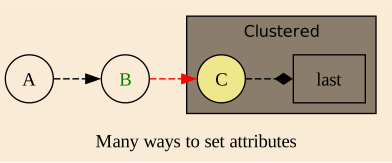
The DOT language representation of the Dot object is
digraph {

    graph [bgcolor=antiquewhite]
    node [shape=circle]
    edge [style=dashed]

    rankdir=LR

    a [label="A"]
    b [label="B" fontcolor=green]

    a -> b
    b -> c [color=red]

    subgraph cluster_1 {
        graph [fontsize=12 fontname="sans-serif"]
        node [shape=box]
        edge [arrowhead=diamond]
        labelloc=t
        bgcolor=bisque4
        c [label="C" style=filled fillcolor=khaki]
        c -> last
        label="Clustered"
    }

    label="Many ways to set attributes"
}
Each keyword argument name except for role should be a Graphviz attribute
name and each value should be an ID or None. Value None
deletes the attribute from the target entity, role, or entity type default if
it was previously specified. If the attribute was not previously specified,
the assignment to None has no effect.
Running the following as a cell in a notebook
dot = Dot(directed=True)
dot.graph(rankdir="LR")
dot.all_default(color="limegreen")
dot.edge("a", "b", color="blue", style="dashed")
dot.show()

# That edge looks terrible.  Let's just use the default.
dot.edge("a", "b", color=None)
dot.show()
displays two images:
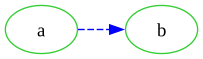
and
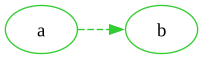
One Graphviz attribute, class, is also a Python reserved name. To enable
applications to specify a value for class and any future conflicting
attribute, Dot strips one trailing underscore character from attribute
keywords if present. Example:
dot.node("a", class_="important", shape_="circle")
Node a will have SVG element class "important" and shape "circle".
The underscore is required for class, and superfluous for shape.
Roles
If you’re familiar with Graphviz, you may wonder if gvdot’s fixed statement order precludes a common technique: restating default attributes to avoid explicitly assigning attributes to particular nodes or edges. Something like
writing
node [color="#10a010"](green), thenwriting statements naming nodes deemed “normal”, then
writing
node [color="#c00000", fontcolor="#e8e8e8"](dark red with white text), thenwriting statements naming nodes deemed “critical”, and so on.
The answer is yes — by design. Having to group nodes or edges together to share a set of attribute values is awkward if the structure of the input driving the generation does not coincide with that grouping. Instead, gvdot applications can assemble diagrams in any sequence that is convenient and assign common attributes using roles.
A role is a named collection of attribute values similar to default node or
edge attributes. Using the special attribute role, applications may
assign a role to a node, edge, or graph, causing that entity to inherit the
role’s attribute values. Suppose we are modeling projects with
@dataclass
class Task:
    id       : str
    name     : str
    requires : tuple[str, ...] = ()
    status   : str = "normal"

@dataclass
class Project:
    tasks: dict[str,Task]
    def __init__(self, tasklist:list[Task]):
        self.tasks = { task.id: task for task in tasklist }
We can generate a project task diagram with
def task_diagram(project:Project):
    dot = Dot(directed=True)
    dot.node_default(shape="box", margin=0.1, style="filled",
                     fontsize=10, fontname="sans-serif",
                     width=0, height=0)
    dot.node_role("normal", color="#10a010")
    dot.node_role("atrisk", color="#ffbf00")
    dot.node_role("critical", color="#c00000", fontcolor="#e8e8e8")
    for id, task in project.tasks.items():
        dot.node(id, label=task.name,
                role=task.status)
        for other in task.requires:
            dot.edge(other, id)
    return dot
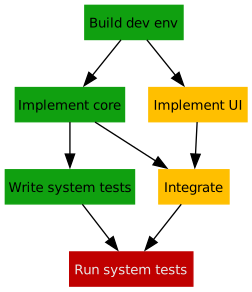
We assign a role to task nodes based on (and in this case with the same name as) the task’s status. The presentation attributes of the node are captured by the role. The resulting diagram might look like
Roles are not a DOT language feature, and other than the effect they have on
entity attributes do not appear in the DOT language representation. The
attribute name role is reserved by gvdot. Only graphs, nodes, and edges
can have attribute role.
A role need not be defined before it is assigned. However, Dot raises
an exception if an assigned role is not defined when the application creates a
DOT language representation or rendering of a Dot object.
Themes
A theme is a normal Dot object from which other Dot objects inherit
graph attributes, default attributes, and roles. While a theme can have nodes,
edges, and subgraphs, those entities are ignored by Dot objects styled by the
theme. Also, whether or not a theme is directed, multigraph, or strict is
irrelevant.
We can improve our task diagrammer above by pulling all presentation attributes
out of task_diagram() into a theme.
project_theme = (Dot()
    .node_default(shape="box", margin=0.1, style="filled",
                  fontsize=10, fontname="sans-serif",
                  width=0, height=0)
    .node_role("normal", color="#10a010")
    .node_role("atrisk", color="#ffbf00")
    .node_role("critical", color="#c00000", fontcolor="#e8e8e8"))
This simplifies our generator to
def task_diagram(project:Project, theme:Dot=project_theme):
    dot = Dot(directed=True).use_theme(theme)
    for id, task in project.tasks.items():
        dot.node(id, label=task.name,
                 role=task.status)
        for other in task.requires:
            dot.edge(other, id)
    return dot
The revised task_diagram() generates the same diagram while allowing the
caller to entirely specify the presentation via a theme. Suppose that
sometimes we want to present project status in a vertically compact way. All
we need is a new theme.
compact_project_theme = (Dot()
    .use_theme(project_theme)
    .graph(rankdir="LR", ranksep=0.25)
    .node_default(margin=0.05)
    .edge_default(arrowsize=0.75))
We only specified what differs because the compact theme inherits from the base theme. When we run
task_diagram(example, compact_project_theme).show()
in a notebook, we see

Subgraphs
Class Block is a scope for graph and default attribute assignments and
a container for node, edge, and subgraph definitions. It is the base class of
Dot, and most methods for building DOT language are actually
Block methods. You can think about class Block as being an
analogue of graph and subgraph curly brackets in the DOT language.
Methods subgraph() and subgraph_define() return Block
objects. A Dot object created by the Dot constructor with descendant
Block objects created through methods subgraph() or
subgraph_define() form a tree. That tree is mirrored by the subgraph
statement hierarchy of the DOT language representation of the Dot object.
Node and edge identities are global within a Dot object. They may only be defined once, but can be amended any number of times through the Dot object or any Block object in the tree. The Block object through which a node or edge is defined determines where it will appear in the subgraph hierarchy and, therefore, the set of default attributes which apply to the node or edge.
dot = Dot(id="Root")
sub = dot.subgraph(id="Sub")
subsub = sub.subgraph(id="SubSub")

assert type(dot) is Dot and isinstance(dot, Block)
assert type(sub) is Block
assert type(subsub) is Block

dot.node("a")
dot.edge("a","b")
subsub.node("b")
subsub.edge("b","c")

dot.node_default(fontsize=10).edge_default(fontsize=10)
sub.node_default(color="green").edge_default(color="green")
subsub.node_default(penwidth=2).edge_default(penwidth=2)
The Dot instance defined above has the DOT language representation
graph Root {
    node [fontsize=10]
    edge [fontsize=10]
    a
    a -- b
    subgraph Sub {
        node [color=green]
        edge [color=green]
        subgraph SubSub {
            node [penwidth=2]
            edge [penwidth=2]
            b
            b -- c
        }
    }
}
Node a and edge a -- b have fontsize 10 with color and
penwidth unspecified, whereas node b and edge b -- c have
fontsize 10, and also color green and penwidth 2.
If a subgraph is a cluster, some Graphviz layout engines (including the default engine, dot) will place all nodes defined within the subgraph together in the layout. Therefore, the Block object through which a node is defined may determine its placement.
Roles are also global within a Dot object. They may be assigned to any entity of the associated kind without regard to the Block object through which the entity is defined. However, roles may only be defined and amended through the Dot object.
Subgraphs are scoped to their parent. So, the assertions below all hold.
dot = Dot()
sub1 = dot.subgraph(id="sub1")
sub1_sub2 = sub1.subgraph(id="sub2")
assert dot.subgraph(id="sub1") is sub1
assert sub1.subgraph(id="sub2") is sub1_sub2
assert dot.subgraph(id="sub2") is not sub1_sub2
Multigraphs
By default, the DOT language representation of a Dot object has no
more than one edge statement for any pair of nodes (ordered pairs for directed
graphs). In the code below
dot = Dot().graph(rankdir="LR")
dot.edge("a", "b", color="red", label="first")
dot.edge("a", "b", color="green", label="second")
dot.edge("a", "b", color="blue", label="third")
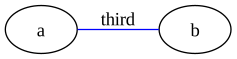
the second and third edge() calls amend the edge a -- b,
resulting in
graph {
    rankdir=LR
    a -- b [color=blue label="third"]
}
|
|
If we construct the Dot object as a multigraph,
dot = Dot(multigraph=True).graph(rankdir="LR")
dot.edge("a", "b", color="red", label="first")
dot.edge("a", "b", color="green", label="second")
dot.edge("a", "b", color="blue", label="third")
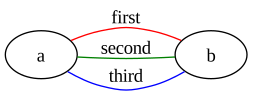
each edge() call defines a new edge. Now we get
graph {
    rankdir=LR
    a -- b [color=red label="first"]
    a -- b [color=green label="second"]
    a -- b [color=blue label="third"]
}
|
|
But what if we want to amend a multigraph edge? For that we use
discriminants, a third component to edge identity used in multigraphs. The
edge() method is declared as
def edge(self, point1:ID|Port, point2:ID|Port,
         discriminant:ID|None=None, /, **attrs:ID|None) -> Dot:
The discriminant parameter is a value allowing an application to refer to
multigraph edges. Discriminants are not required in multigraphs, and if
provided need only be unique among the edges of their associated node pair.
dot = Dot(multigraph=True).graph(rankdir="LR")
dot.edge("a", "b", 1, color="red", label="first")
dot.edge("a", "b", 2, color="green", label="second")
dot.edge("a", "b", 3, color="blue", label="third")

# Amend the green edge
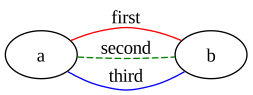
dot.edge("a", "b", 2, style="dashed")
graph {
    rankdir=LR
    a -- b [color=red label="first"]
    a -- b [color=green label="second" style=dashed]
    a -- b [color=blue label="third"]
}
|
|
Discriminants are a gvdot feature. As you can see, they don’t appear in the
DOT language representation. We used integer discriminants in this example
because it was convenient, but discriminants can be any ID.
Nonces
Applications that generate Graphviz diagrams often need to synthesize identifiers for nodes and sometimes subgraphs. Consider the NFA example on the landing page. To depict an arrow leading into the start state,
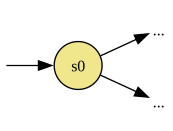
we use an edge to the start state from an initial node assigned role
"init" defined as
node_role("init", label="", shape="none", width=0, height=0)
The "init" role attributes make the initial node invisible. We create the
initial node and edge at the bottom of the fragment below.
def nfa_diagram(nfa:NFA, title:str):

    dot = Dot(directed=True).use_theme(nfa_theme)
    dot.graph(label=Markup(f"<b>{title}<br/></b>"))

    init_id = ... # <-- What to put here?
    dot.node(init_id, role="init")
    dot.edge(init_id, nfa.start)
    ...
But what ID should we assign to init_id? The remainder of the
generation code creates state nodes with identifiers that are the state name.
If we pick something like "_init_", we either must enforce a state name
restriction, complicate our generation code with some kind of indirection, or
hope the input source isn’t malicious.
The gvdot solution is class Nonce. A Nonce is a placeholder that
Dot resolves to a unique DOT language ID when generating DOT language
representations. Using Nonce, the code above becomes
def nfa_diagram(nfa:NFA, title:str):

    dot = Dot(directed=True).use_theme(nfa_theme)
    dot.graph(label=Markup(f"<b>{title}<br/></b>"))

    init_id = Nonce()  # <-- Will resolve to a unique DOT language ID
    dot.node(init_id, role="init")
    dot.edge(init_id, nfa.start)
    ...
The DOT language representation of the NFA diagram includes the node and edge statements
_nonce_1 [label="" shape=none width=0 height=0]
_nonce_1 -> s0
Suppose the NFA definition is modified so that one of the states is named
"_nonce_1". Then those statements would become
_nonce_2 [label="" shape=none width=0 height=0]
_nonce_2 -> s0
Dot chooses a different ID for the Nonce to avoid a conflict with
_nonce_1.
Nonce is a member of the ID type union, so instances can be
used everywhere in the gvdot API where ID is accepted.
Both the Entity Relationship Diagram and Red-Black Trees examples in this document use
Nonces. The ER Diagram generator uses Nonce to synthesize identifiers
for nodes representing entity attributes. The red-black tree generator creates
phantom nodes with Nonce identifiers to steer Graphviz toward a good
tree layout.
Rendering
Package gvdot executes Graphviz programs to render Dot objects. The
input to these programs is the DOT language representation you can see with
dot = task_diagram(project)
print(dot)
or in a notebook
dot = task_diagram(project)
dot.show_source()
Method Dot.to_rendered() is the core rendering method. It accepts
several optional arguments including the program to run and the output format
desired. If the execution succeeds, it returns the raw bytes the program
writes to stdout.
dot = task_diagram(project)
data = dot.to_rendered(dpi=300)
assert type(data) is bytes
Here we ran the default program dot to render the task diagram into the
default format png. We specified the image should be generated with a
resolution of 300 dots per inch.
Dot includes three other rendering methods which all call to_rendered():
Dot.to_svg()renders to SVG and returns the result as a string.Dot.save()renders and saves to a file.Dot.show()renders and displays the result in a notebook.
Defining and Amending
The terms “define”, “establish”, and “amend” are used throughout the Reference, sometimes together as “define or amend” or “establish or amend”. In the context of gvdot method descriptions,
define means create a node, edge, subgraph, or role and assign initial attribute values if applicable. Defined nodes, edges, and subgraphs will appear as statements in the DOT language representation. Defined roles are recorded for resolution in that representation.
establish means assign initial graph, default graph, default node, or default edge attribute values.
amend means make additional attribute value assignments to already defined or established entities, roles, and defaults, overwriting existing assignments with the same attribute names. In the case of edges, amend also means potentially changing an endpoint’s
port specification. In the case of subgraphs, the Reference uses the phrase “prepare to amend” because the relevant methods return a reference through which the application may modify the subgraph.
The core methods for building out the structure of a diagram are
node(), edge(), and subgraph(). These
methods are “define or amend” — they define an entity if it doesn’t exist,
and amend it otherwise. Variants node_define(),
edge_define(), and subgraph_define() raise exceptions
if the entity is already defined, while node_update(),
edge_update(), and subgraph_update() raise exceptions
if it is not. The “define and amend” versions have the advantage of giving
code a clean, declarative feel. The ..._define and ..._update variants
can make buggy code fail faster.