Red-Black Trees
Our goal is to produce illustrations for students learning about Robert Sedgewick’s Left-leaning Red-Black Trees.
As usual, we begin by creating a theme.
rb_theme = (Dot()
    .all_default(penwidth=1.5)
    .node_default(
        fontname="Helvetica", fontsize=14, fontcolor="#eeeeee",
        style="filled", shape="circle", fixedsize=True, height=0.35)
    .edge_default(arrowhead="none")
    .node_role("red", fillcolor="#f31020")
    .node_role("black", fillcolor="#001122")
    .edge_role("phantom", style="invisible"))
Before we write the generation code, let’s see how this looks by building a
tree by hand. To ensure dot lays out the tree correctly, we use subgraphs
and phantom (invisible) edges to ensure sibling nodes are on the same rank
and ordered correctly.
dot = Dot(directed=True).use_theme(rb_theme)
dot.node(2, role="black")
dot.node(1, role="black")
dot.node(4, role="black")
dot.node(3, role="red")
dot.edge(2, 1)
dot.edge(2, 4)
dot.edge(4, 3)
dot.subgraph().graph(rank="same").edge(1, 4, role="phantom")
dot.show()
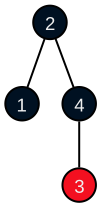
The nodes are nice, but the children of 2 are crowded, and we can’t
visually determine if 3 is the left or right child of 4. We will solve
these problems by adding phantom nodes — every parent will have three
children, including at least one phantom.
We add a phantom node role to the theme, joining the existing phantom edge role
rb_theme.node_role("phantom", style="invisible", label="")
and use it in our hand-crafted tree.
dot = Dot(directed=True).use_theme(rb_theme)
dot.node(2, role="black")
dot.node(1, role="black")
dot.node(4, role="black")
dot.node(3, role="red")
dot.node("phantom_1", role="phantom") # Child of 2, between 1 and 4
dot.node("phantom_2", role="phantom") # Child of 4, right of 3
dot.node("phantom_3", role="phantom") # Child of 4, rightmost

dot.edge(2,1)
dot.edge(2,"phantom_1", role="phantom")
dot.edge(2,4)
(dot.subgraph().graph(rank="same")
.edge(1, "phantom_1", role="phantom")
.edge("phantom_1", 4, role="phantom"))

dot.edge(4,3)
dot.edge(4,"phantom_2", role="phantom")
dot.edge(4,"phantom_3", role="phantom")
(dot.subgraph().graph(rank="same")
.edge(3, "phantom_2", role="phantom")
.edge("phantom_2", "phantom_3", role="phantom"))

dot.show()
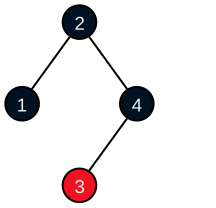
Much better, but tedious to construct by hand. Time to automate.
We create a simple red-black tree implementation based on Sedgewick’s paper.
RED   = 1
BLACK = 0

@dataclass
class RBNode:
    key    : int
    color  : int = RED
    left   : RBNode | None = None
    right  : RBNode | None = None

@dataclass
class RBTree:
    root : RBNode | None = None

    def insert(self, key:int) -> None:
        self.root = _insert_node(self.root, key)
        self.root.color = BLACK

# ... elided ...
(We have only shown what is necessary for the discussion below. The full implementation is available on GitHub.)
Now we write the generation code.
def rb_diagram(tree:RBTree) -> Dot:
    #
    # Yield tree nodes in pre-order sequence.
    #
    def traverse(node):
        if node:
            yield node
            yield from traverse(node.left)
            yield from traverse(node.right)
    #
    # Add a child of node to the diagram, a phantom if child is None.
    #
    def link(node:RBNode, child:RBNode|None) -> ID:
        if child is not None:
            dot.edge(node.key, child.key)
            return child.key
        else:
            phantom_id = Nonce("phantom")
            dot.node(phantom_id, role="phantom")
            dot.edge(node.key, phantom_id, role="phantom")
            return phantom_id
    #
    # Build the diagram with every node and tree edge, including phantoms.
    #
    dot = Dot(directed=True).use_theme(rb_theme)
    for node in traverse(tree.root):
        dot.node(node.key, role="red" if node.color == RED else "black")
        if node.left or node.right:
            c1 = link(node, node.left)
            c2 = link(node, None)
            c3 = link(node, node.right)
            block = dot.subgraph().graph(rank="same")
            block.edge(c1,c2,role="phantom").edge(c2,c3,role="phantom")

    return dot
All that’s left is generating our illustrations.
from IPython.display import display, Markdown

sequence = [ 71, 59, 58, 51, 43, 34, 18 ]

tree = RBTree()
tree.insert(sequence[0])

display(Markdown(f"#### We start with {sequence[0]}:"))
rb_diagram(tree).show()
for key in sequence[1:]:
    tree.insert(key)
    display(Markdown(f"#### After inserting {key}:"))
    diagram = rb_diagram(tree)
    diagram.show()
We start with 71: |

|
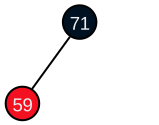
After inserting 59: |
|
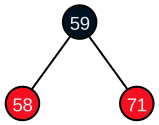
After inserting 58: |
|
After inserting 51: |
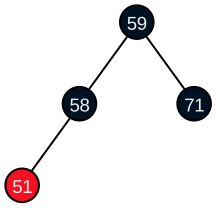
|
After inserting 43: |
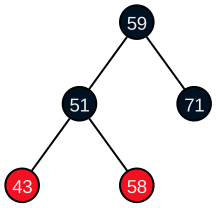
|
After inserting 34: |
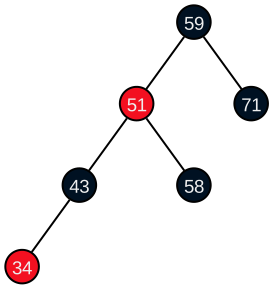
|
After inserting 18: |
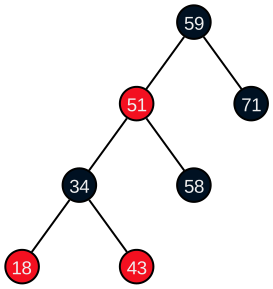
|
The DOT language of our final tree diagram is
digraph {

    graph [penwidth=1.5]
    node [penwidth=1.5 fontname=Helvetica fontsize=14 fontcolor="#eeeeee" style=filled shape=circle fixedsize=true height=0.35]
    edge [penwidth=1.5 arrowhead=none]

    59 [fillcolor="#001122"]
    phantom_1 [style=invisible label=""]
    51 [fillcolor="#f31020"]
    phantom_2 [style=invisible label=""]
    34 [fillcolor="#001122"]
    phantom_3 [style=invisible label=""]
    18 [fillcolor="#f31020"]
    43 [fillcolor="#f31020"]
    58 [fillcolor="#001122"]
    71 [fillcolor="#001122"]

    59 -> 51
    59 -> phantom_1 [style=invisible]
    59 -> 71
    51 -> 34
    51 -> phantom_2 [style=invisible]
    51 -> 58
    34 -> 18
    34 -> phantom_3 [style=invisible]
    34 -> 43

    subgraph {
        rank=same
        51 -> phantom_1 [style=invisible]
        phantom_1 -> 71 [style=invisible]
    }

    subgraph {
        rank=same
        34 -> phantom_2 [style=invisible]
        phantom_2 -> 58 [style=invisible]
    }

    subgraph {
        rank=same
        18 -> phantom_3 [style=invisible]
        phantom_3 -> 43 [style=invisible]
    }
}
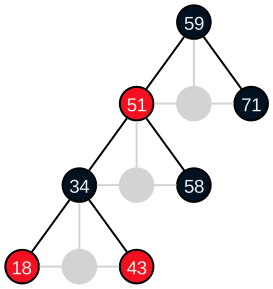
To better understand what the phantoms contributed, we can make them visible. We don’t need to modify the diagram; we just amend the phantom roles in the theme.
rb_theme.node_role("phantom", style=None, color="lightgray")
rb_theme.edge_role("phantom", style=None, color="lightgray")
diagram.show()
displays
This Red-Black Tree example is available as a notebook on GitHub .